
30% Off – Annual InVideo Studio Subscription + Free AI Minutes – InVideo Coupon October 2026

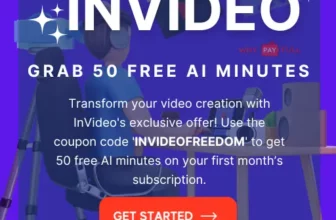
Check the InVideo coupon for a listed 30% off an annual InVideo Studio subscription plus free AI minutes. This past campaign isn’t confirmed active, so verify the offer at checkout.
Planning to make videos with InVideo? A 30% discount can make an annual subscription more appealing, but the coupon details here describe a past campaign—not an offer confirmed as available now. The campaign was listed for June 25 to July 4, 2026, with code INVIDEOFREEDOM30 for a flat 30% off an annual InVideo Studio subscription, plus free AI minutes. Check the current checkout page before budgeting around this deal or committing to a year.
InVideo Coupon: 30% Off Annual Studio Subscription
The discount was tied to an annual plan, so it may not apply to monthly billing or every InVideo product. The offer description also mentions free AI minutes, but does not specify how many minutes were included or how long they remained available. Treat both details as campaign-specific and confirm the terms shown for your account before paying.
Offer Details
| Offer | Discount | Applies to | How to redeem / Important notes |
|---|---|---|---|
| INVIDEOFREEDOM30 annual subscription offer | Flat 30% off, plus free AI minutes as stated in the campaign | Annual InVideo Studio subscription | Activate Offer |
What the InVideo Coupon Was Intended to Save On
The code INVIDEOFREEDOM30 was presented as a way to reduce the annual subscription price by 30%. That can be worthwhile if you already expect to use InVideo throughout the year. It is less compelling if you only need to create one short campaign or are still deciding whether an AI-assisted editor fits your workflow.
Features described with the offer
The campaign description highlights AI-assisted video creation, automatic editing, voiceovers and text-to-speech. It also lists more than 4,000 templates and over one million royalty-free images and video clips. These figures and tools describe the offer information, not a guarantee that every item is included in every current plan. Check the plan comparison for the features, usage limits and media rights that apply to your subscription.
- Templates: A template-led workflow can help you get a first draft together for social posts, promotions or presentations. Check whether the available designs suit your format and brand before subscribing.
- Stock media: The stated media library may help when you do not have suitable footage of your own. Review the current licensing terms, especially if a video will be used in paid advertising or for a client.
- AI minutes: Free minutes were mentioned as a bonus, but the quantity, eligible tools and expiry rules were not specified. Confirm these details in the offer terms rather than assuming the bonus covers a full project.
- Voice and text tools: Automated narration can be useful for explainers, while a recorded voice may suit content that needs a more personal tone. Preview the output and check language and pronunciation for your intended audience.
Is an Annual InVideo Plan a Good Fit?
An annual plan makes most sense when you have recurring video work: for example, a small business preparing regular product explainers, a creator publishing on a schedule, or a team producing several campaign assets. The discount lowers the subscription cost, but it does not by itself prove that the yearly plan is cheaper for your actual usage. Compare the annual total with the monthly option currently shown at checkout, and consider how many months you will genuinely use the service.
If you are in India, look at the final checkout amount and billing currency before confirming. Check whether taxes or other charges are added, what the renewal price will be, and how cancellation works. These terms can vary by plan and account, so rely on the current checkout and subscription information rather than assuming the campaign price continues at renewal.
It is also worth testing your workflow before buying annually. Prepare a short script, decide whether you need AI-generated narration or your own voice, and note the video formats you publish most often. Then check whether the plan supports those tasks and whether its AI-minute allowance, export options and media terms suit your expected volume. The original offer does not provide enough detail to confirm those limits.
How to Check and Apply the InVideo Coupon
If the code is still accepted for your account, use the checkout total—not the advertised percentage alone—to confirm the saving. The steps below explain how the historical code was intended to be used; availability and checkout labels may have changed.
- Open InVideo’s official website and review the current plans and included features.
- Sign in or create an account, then select the annual InVideo Studio plan only if it matches your expected use.
- At checkout, enter INVIDEOFREEDOM30 in the coupon or promo-code field, if one is available.
- Check that the displayed price changes and that any AI-minute bonus and its conditions are shown clearly. If the code is rejected or the terms are missing, do not assume the discount has been applied.
- Before completing payment, review the billing interval, currency, taxes, renewal amount and cancellation terms. Save the confirmation and offer details for your records.
A coupon can be restricted by plan, account type or campaign dates. The earlier promotion was described as running from June 25 to July 4, 2026, so its code should not be treated as evergreen. If it no longer works, check the official plan page for a current promotion rather than relying on an old code or an unconfirmed discount.
What to Check Before You Subscribe
Plan limits and AI-minute terms
“Free AI minutes” is not a complete description of a benefit. Find out which tools use minutes, whether unused minutes expire, and what happens after the allowance is used. If your projects involve longer scripts or frequent revisions, those limits may matter more than the initial coupon saving.
Templates, exports and media permissions
Template counts and library size are only starting points. Check that the current selection supports the aspect ratios and channels you publish to, and confirm the export settings available on the plan. For commercial work, read the current terms for stock footage, images and music before using them in a client deliverable or paid campaign.
Team use and recurring billing
The offer description mentions collaboration and sharing, but does not establish which plan includes which team features. If multiple people need access, verify seats, permissions and collaboration limits. Also check the renewal date and price: a one-time discount can make the first billing period less expensive without changing the rate charged later.
InVideo Features Mentioned in the Campaign
The campaign also described voiceover and text-to-speech options, a royalty-free media library, customisable templates and high-quality exports. It referred to collaboration features for editing, previewing and sharing. As plan inclusions can change, use these as points to verify on the current product page—not as a guarantee that a particular subscription provides every feature or export setting.
For a first project, keep the scope modest: draft the script, choose a template, review the visuals and narration, and check the finished video on the platform where you intend to publish it. This helps you judge whether the editing process and available controls suit your work before you commit to a longer billing period.
The code attached to the promotion was INVIDEOFREEDOM30. The campaign details do not establish that the code remains valid, so confirm its acceptance and the final price directly at checkout.
Conclusion
The listed InVideo promotion offered a flat 30% off an annual Studio subscription with free AI minutes, using INVIDEOFREEDOM30 (also shown here). Its stated campaign period was June 25 to July 4, 2026, and the offer is not confirmed as active now. If the code is accepted at checkout, compare the final annual cost with your expected video workload and verify the AI-minute, renewal and cancellation terms before paying.

What was the InVideo coupon code?
The campaign listed the code INVIDEOFREEDOM30 for a flat 30% discount on an annual InVideo Studio subscription. Its current validity is not confirmed.
What did the InVideo coupon offer?
It was described as 30% off the annual subscription, with free AI minutes. The campaign details do not specify the number of minutes or their expiry terms.
Did the discount apply to monthly InVideo plans?
The stated offer applied to an annual InVideo Studio subscription. It does not confirm a discount on monthly billing or other plans.
Is the INVIDEOFREEDOM30 code active now?
The offer was listed for June 25 to July 4, but current availability is unverified. Check whether the code is accepted and the discount appears in the checkout total.
What should I check before buying an annual plan in India?
Review the final checkout amount and currency, taxes, renewal price, cancellation terms, plan limits and any conditions attached to AI minutes or media usage.
Related Reading
- InVideo Offer: Grab 50 Free AI Minutes Using This Exclusive Coupon!
- Acer Christmas Sale 2026: Save Big with Flat 40% Off + Extra 7% Student Discount!
- Unlock Exclusive Savings: SE Ranking Coupon Code 2026 Offers Flat 20% Off + Free 15 Days Trial
How to avail Today's Deal?
- Click on Activate Offer / Show Coupon Button
- Go to Offer Page.
- Now Select the Products Of Your Choice.
- Now Add selected Products in your Cart
- Login / Signup in Your Account
- Enter Your Billing / Shipping Address.
- Make the Payment.
- Done | Don't forget to share with others.
Subscribe to our list
Don't worry, we don't spam
Disclosure: Some of the links in this post/video are “affiliate links” – what this means is that if you click on the link and choose to make a purchase, I will receive an affiliate commission [YOU WILL NOT PAY ANY EXTRA COST].




[…] InVideo AI Coupon Code 2024: Save Big with Flat 30% Off Annual Subscription + Free AI Minutes […]